
-
Filter By Category
- Android Charging Cables Australia | USB-C & USB Cables (9)
- Micro B USB Cables (5)
- Mini B USB Cable (4)
-
Filter By Stock
- In Stock (69)
Filter By Brand
- Aus Electronics Direct (109)
- samsung (2)
- Sony (1)
USB Cables
Popular Products




USB Cables
Shop USB cables at Aus Electronics Direct for connecting computers, laptops, phones, tablets, printers, storage devices, development boards and other compatible electronic equipment. Our range includes USB-A, USB-C, USB-B, Micro USB and Mini USB cables in a variety of lengths and USB standards.
Choose from cables for data transfer, charging, device connectivity and USB extension applications. Depending on the model, options include USB 2.0, USB 3.0, USB 3.2 and USB4 cables, as well as USB-A to USB-C, USB-C to USB-C, USB-A to Micro USB and USB-A to Mini USB connections.
When choosing a USB cable, check the connector type at both ends, required data transfer speed, charging power, cable length and device compatibility. USB-C describes the connector shape, but different USB-C cables can support different data rates, power levels and functions.
Browse our USB cable range to find the right cable for your computer, peripheral, mobile device, electronics project or other compatible equipment.
Types of USB Cables
USB cables are available with different connectors, USB standards and lengths. Choosing the correct cable depends on the ports and functions supported by the devices you want to connect.
USB-A Cables
USB-A cables use the familiar rectangular USB-A connector found on many computers, laptops, hubs, chargers and older electronic equipment. USB-A cables are available with different connectors at the other end, including USB-C, Micro USB and Mini USB.
USB-C Cables
USB-C cables use the reversible USB Type-C connector and are widely used with modern computers, laptops, smartphones, tablets and other electronics. USB-C cables can support different data transfer speeds and charging capabilities, so check the specifications of the cable and connected devices before purchasing.
For USB-C to USB-C and higher-performance USB-C requirements, see our dedicated USB-C cable range.
Micro USB Cables
Micro USB cables are used with various older smartphones, tablets, electronics projects, cameras, GPS devices and other compatible equipment. Check whether your device requires Micro-B or another Micro USB connector before ordering.
Mini USB Cables
Mini USB cables are used with selected older electronics, cameras, GPS equipment and other devices. They are different from Micro USB connectors, so check the device port carefully before purchasing.
USB-B Cables
USB-B cables are commonly used with printers, scanners and selected computer peripherals. Different USB-B connector types exist, so confirm the connector required by your equipment.
USB Extension Cables
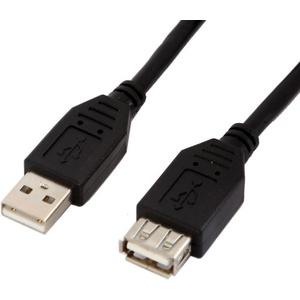
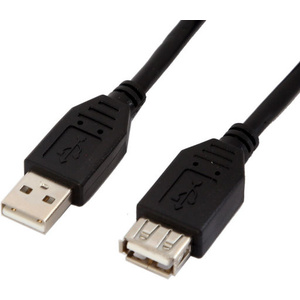
USB extension cables extend the distance between a compatible USB device and computer, hub or other USB connection. For longer cable runs, check the supported USB standard and whether an active extension cable or repeater is required.
How to Choose the Right USB Cable
Before buying a USB cable, check these five things:
1. Connector type
Confirm the connector on both devices. Common combinations include USB-A to USB-C, USB-C to USB-C, USB-A to Micro USB and USB-A to Mini USB.
2. USB standard and speed
USB 2.0, USB 3.x and USB4 cables can support different data transfer rates. Check the specifications of both the cable and connected devices.
3. Charging requirements
Not every USB cable supports the same charging power. For USB-C charging, check the cable's power rating and compatibility with the charger and device.
4. Cable length
Choose a length suitable for your desk, workstation, vehicle, electronics project or other installation. Longer USB connections may require an active extension or repeater.
5. Device compatibility
The connector shape alone does not guarantee that a cable supports every required function. Check data, charging, video and other requirements before purchasing.
FAQ
What USB cable do I need?
The correct USB cable depends on the ports on both devices and the functions required. Check the connector type, USB standard, data speed, charging requirements and cable length before purchasing.
What is the difference between USB-A and USB-C?
USB-A and USB-C are different connector types. USB-A is the traditional rectangular connector, while USB-C is a smaller reversible connector commonly used on newer computers, phones, tablets and other devices.
Are all USB-C cables the same?
No. USB-C describes the connector shape, but USB-C cables can support different data speeds, charging power and other functions. Check the specifications of the cable and connected devices.
What is a Micro USB cable used for?
Micro USB cables are used with various older smartphones, tablets, cameras, GPS devices, electronics projects and other compatible equipment.
What is a USB-B cable used for?
USB-B connectors are commonly used with printers, scanners and some other computer peripherals.
Can a USB cable charge and transfer data?
Some USB cables support both charging and data transfer, while others may have more limited functionality. Check the individual cable specifications before purchasing.
What USB cable is best for fast data transfer?
Choose a cable that supports the required USB standard and data rate, and make sure the connected devices also support that speed. A higher-specification cable cannot make devices transfer data faster than their supported standard.
