-
Filter By Stock
- In Stock (1)
Filter By Brand
- Arduino (1)
- iduino (1)
Arduino Due Development Board
Popular Products
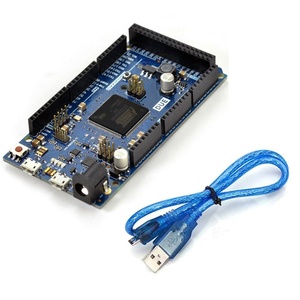
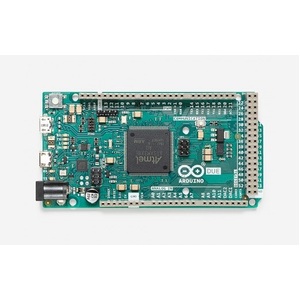
Arduino Due Development Board
Explore the Arduino Due development board at Aus Electronics Direct, a powerful 32-bit microcontroller platform designed for advanced electronics projects, embedded systems and prototyping. Based on the Atmel SAM3X8E ARM Cortex-M3 processor, the Arduino Due offers greater processing capability and memory than many traditional 8-bit Arduino boards.
Operating at 84MHz, the Arduino Due provides 54 digital input/output pins, 12 analogue input pins and two digital-to-analogue converter (DAC) outputs. It also features four hardware serial ports, making it suitable for projects involving multiple sensors, communication modules and external devices.
Arduino Due Features and Specifications
The Arduino Due combines a 32-bit processor with a wide range of input and output connections. Key features include:
-
Microcontroller: Atmel SAM3X8E ARM Cortex-M3
-
Processor architecture: 32-bit ARM
-
Clock speed: 84MHz
-
Operating voltage: 3.3V
-
Digital I/O pins: 54
-
PWM outputs: 12
-
Analogue inputs: 12
-
Analogue outputs: 2 DAC channels
-
Flash memory: 512KB
-
SRAM: 96KB
-
Hardware serial ports: 4 UARTs
-
Connectivity: Native USB, programming USB and SPI interface
These features make the Arduino Due suitable for projects requiring additional processing power, memory, analogue capabilities and multiple communication interfaces.
What Is the Arduino Due Used For?
The Arduino Due is suitable for a wide range of electronics and embedded development applications. Its processing capabilities and extensive I/O connections make it useful for:
-
Robotics and motor control systems
-
Advanced sensor monitoring and data acquisition
-
Industrial automation prototypes
-
Embedded control applications
-
Audio and waveform generation using DAC outputs
-
Communication systems using multiple serial interfaces
-
USB host projects with compatible peripherals
-
Educational electronics and microcontroller development
Arduino Due 3.3V Logic and Compatibility
An important consideration when choosing an Arduino Due is its 3.3V operating logic. Unlike many traditional Arduino boards that use 5V logic, the Due's digital input/output pins are not 5V tolerant. Applying a 5V signal directly to these pins can damage the microcontroller.
When connecting sensors, shields or other electronic modules, check their operating voltage and logic-level requirements. Use a suitable logic-level converter when interfacing with 5V devices that are not directly compatible.
Arduino Due USB Connectivity
The Arduino Due provides two USB connections for programming and peripheral communication. Its native USB port supports USB host functionality, allowing compatible external devices such as keyboards and mice to connect to the board. The programming USB connection is used to upload sketches and communicate with the microcontroller.
Choose the Right Arduino Development Board
The Arduino Due is a useful option for projects requiring a 32-bit ARM processor, more memory, analogue outputs and extensive connectivity. For simpler projects, an Arduino Uno may be sufficient, while an Arduino Mega can be a suitable alternative when a project needs numerous I/O connections and 5V logic compatibility.
Explore the Arduino Due development board at Aus Electronics Direct and find compatible sensors, modules, cables, power supplies and electronic components for your next project.
Frequently Asked Questions – Arduino Due Development Boards
1. What is an Arduino Due development board?
The Arduino Due is a 32-bit microcontroller development board based on the Atmel SAM3X8E ARM Cortex-M3 processor. It operates at 84MHz and provides extensive input/output connections, analogue inputs and DAC outputs. It is designed for advanced electronics projects, embedded systems, robotics and applications requiring greater processing performance than traditional 8-bit Arduino boards.
2. What is the Arduino Due used for?
The Arduino Due is used for advanced electronics prototyping, robotics, automation, sensor monitoring and embedded control applications. Its 32-bit processor, multiple communication interfaces and analogue capabilities make it suitable for projects involving motor control, data acquisition, waveform generation, USB peripherals and complex sensor systems.
3. What microcontroller does the Arduino Due use?
The Arduino Due uses the Atmel SAM3X8E ARM Cortex-M3 microcontroller. It features a 32-bit processor running at 84MHz, 512KB of flash memory and 96KB of SRAM. These specifications provide the processing power and memory needed for more demanding embedded applications and complex Arduino projects.
4. What is the difference between Arduino Due and Arduino Mega?
The main difference is their processor architecture and operating voltage. The Arduino Due uses a 32-bit ARM Cortex-M3 processor running at 84MHz and operates at 3.3V. The Arduino Mega 2560 uses an 8-bit ATmega2560 processor running at 16MHz and operates at 5V. The Due also provides two DAC outputs, while the Mega is commonly chosen for projects requiring 5V compatibility and extensive I/O.
5. How many digital pins does the Arduino Due have?
The Arduino Due provides 54 digital input/output pins. These pins can be configured as digital inputs or outputs to connect components such as LEDs, buttons, sensors, displays and other electronic modules. The board also provides 12 PWM-capable pins for applications requiring pulse-width modulation, including motor speed and LED brightness control.
6. How many PWM pins does the Arduino Due provide?
The Arduino Due has 12 PWM-capable digital pins. PWM, or Pulse Width Modulation, allows the board to control devices by varying the duty cycle of an output signal. Common applications include adjusting LED brightness, controlling compatible motor drivers and managing other electronic devices that support PWM input.
7. How many analogue inputs does the Arduino Due have?
The Arduino Due provides 12 analogue input pins with 12-bit analogue-to-digital conversion capability. These inputs can measure varying voltage signals from compatible sensors, potentiometers and other analogue devices. They are useful for applications such as environmental monitoring, data acquisition, temperature measurement and electronic control systems.
8. What are the DAC outputs on the Arduino Due used for?
The Arduino Due has two DAC (Digital-to-Analogue Converter) outputs that convert digital values into analogue voltage signals. They are useful for generating waveforms, audio signals, reference voltages and control signals for compatible electronic equipment. Unlike PWM outputs, DAC outputs produce an actual analogue voltage rather than a rapidly switched digital signal.
9. Does the Arduino Due operate at 3.3V or 5V?
The Arduino Due operates at 3.3V logic. Its microcontroller input/output pins are designed for a maximum of 3.3V and are not 5V tolerant. Although the board has a regulated 5V power rail, this does not mean its digital pins can safely accept 5V signals. Always check voltage requirements before connecting external components.
10. Is the Arduino Due compatible with 5V sensors?
The Arduino Due is not directly compatible with 5V signals on its digital or analogue input pins. Applying 5V directly to these pins can damage the microcontroller. To connect a 5V sensor, use an appropriate logic-level converter, voltage divider or compatible interface circuit. Check the sensor's output voltage and electrical specifications before connecting it.
11. What is the difference between the Arduino Due programming port and native USB port?
The programming USB port is primarily used to upload sketches from the Arduino IDE and communicate with the board's programming interface. The native USB port connects directly to the SAM3X8E microcontroller and supports USB host functionality. This allows compatible USB peripherals, such as keyboards and mice, to communicate with the Arduino Due.
12. How do I connect an Arduino Due to a computer?
Connect the Arduino Due to your computer using a compatible USB data cable connected to its programming port. Install or open the Arduino IDE, select Arduino Due (Programming Port) from the board menu and choose the corresponding serial port. You can then write, compile and upload your Arduino sketch. The native USB port is available for projects requiring USB host or native USB functionality.
13. How do I power an Arduino Due development board?
The Arduino Due can be powered through its USB connection or with an external power supply connected to its DC power jack or VIN pin. The recommended external input voltage is 7–12V. A suitable regulated power supply should be used, and the voltage limits must be observed to avoid damaging the board.
14. Is the Arduino Due compatible with Arduino shields?
The Arduino Due is compatible with Arduino shields designed for the Arduino 1.0 pinout that also support 3.3V operation. However, not every Arduino Uno or Mega shield will work correctly with the Due. Check the shield's voltage requirements, pin assignments and library compatibility before connecting it. Shields that output 5V signals may require level shifting.
15. What accessories do I need for an Arduino Due project?
Common Arduino Due accessories include a compatible USB cable, breadboard, jumper wires, LEDs, resistors, push buttons and sensors. Depending on your project, you may also need a suitable external power supply, motor driver, display module, communication module or logic-level converter. Choose accessories that support the Due's 3.3V logic and check their electrical compatibility before connecting them.