
-
Filter By Stock
- In Stock (1)
Filter By Brand
- iduino (1)
WeMos ESP8266 WiFi Development Boards
Popular Products
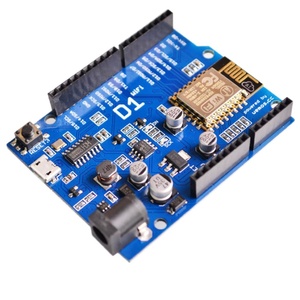
WeMos ESP8266 WiFi Development Boards
Explore WeMos development boards at Aus Electronics Direct. Designed for wireless electronics projects, the WeMos ESP8266 development board combines microcontroller functionality with built-in Wi-Fi connectivity, making it suitable for Internet of Things (IoT) applications, smart home automation, wireless monitoring and Arduino-compatible projects.
The WeMos D1 R2 is based on the ESP8266 Wi-Fi microcontroller and features an Arduino Uno-compatible board footprint. This allows developers to explore wireless communication and connected electronics projects using a familiar development board layout.
What Is a WeMos Development Board?
A WeMos development board is a microcontroller platform designed for building electronic projects with wireless connectivity. Many WeMos boards use the ESP8266 Wi-Fi chip, which enables devices to connect to wireless networks and communicate with other devices over the internet or a local network.
The WeMos D1 R2 combines ESP8266-based Wi-Fi functionality with an Arduino Uno-style footprint, making it useful for developers who want to add wireless connectivity to existing Arduino project designs.
Features of the WeMos D1 R2 Development Board
The WeMos D1 R2 offers several features for electronics prototyping and wireless applications:
-
ESP8266 Wi-Fi connectivity: Enables wireless communication with compatible networks and connected devices.
-
Arduino Uno-style footprint: Provides a familiar physical layout for Arduino-based development.
-
Microcontroller functionality: Supports programmable control of sensors, modules and electronic components.
-
Wireless communication: Allows devices to send and receive data over Wi-Fi.
-
Arduino IDE compatibility: Supports development using the Arduino programming environment when configured with the appropriate ESP8266 board package.
-
IoT project support: Suitable for developing connected devices, automation systems and remote monitoring applications.
Benefits of Using an ESP8266 WiFi Development Board
An ESP8266 development board provides a convenient way to introduce wireless connectivity into electronics projects without requiring a separate Wi-Fi module.
Some of the key benefits include:
-
Built-in Wi-Fi: Connect electronic devices to compatible wireless networks.
-
Remote monitoring: Collect and access sensor information over a network.
-
Smart automation: Control compatible electronic devices remotely.
-
Compact development platform: Build connected electronics prototypes without a separate Wi-Fi communication board.
-
Cost-effective prototyping: Develop wireless applications using an affordable microcontroller platform.
What Can You Build with a WeMos Development Board?
WeMos ESP8266 boards are suitable for a variety of wireless electronics and IoT projects, including:
-
Smart home automation systems.
-
Wi-Fi-controlled lighting and appliances.
-
Wireless temperature and humidity monitoring.
-
Remote sensor monitoring systems.
-
Internet-connected environmental monitoring devices.
-
Wireless relay control projects.
-
Network-connected data logging systems.
-
DIY IoT prototypes and connected gadgets.
These applications make WeMos development boards useful for electronics enthusiasts, students, makers and developers exploring wireless technology.
WeMos ESP8266 vs Arduino Uno
The WeMos D1 R2 and Arduino Uno have different strengths depending on project requirements.
The Arduino Uno is based on the ATmega328P microcontroller and is commonly used for learning electronics, circuit prototyping and controlling connected components. The WeMos D1 R2 uses the ESP8266 platform and provides integrated Wi-Fi connectivity, making it particularly suitable for wireless applications and IoT projects.
Choose a WeMos board when built-in Wi-Fi is important to your project. Choose an Arduino Uno when you need a traditional 5V Arduino platform or compatibility with existing Uno-based hardware.
WeMos ESP8266 vs ESP32 Development Boards
Both ESP8266 and ESP32 development boards are popular choices for wireless electronics projects.
The ESP8266 provides Wi-Fi connectivity and is suitable for many basic IoT applications, wireless sensors and home automation projects. ESP32 boards offer additional capabilities, with many models supporting both Wi-Fi and Bluetooth, along with greater processing resources and peripheral options.
Consider your project's wireless communication requirements, processing needs, available memory and connected components when selecting a development board.
Choosing the Right WiFi Development Board
Before selecting a WeMos or ESP8266 development board, consider:
-
Wireless connectivity: Check Wi-Fi requirements and network compatibility.
-
Microcontroller: Confirm whether the board uses ESP8266 or another processor.
-
Board layout: Consider whether an Uno-style footprint is required.
-
Operating voltage: Check the logic voltage and power input requirements.
-
Input and output connections: Ensure the available pins support your sensors and electronic components.
-
Programming environment: Confirm compatibility with your preferred development tools and libraries.
-
Project requirements: Consider memory, processing capabilities and communication needs.
Shop WeMos ESP8266 development boards at Aus Electronics Direct and explore our range of Arduino-compatible components for wireless automation, IoT applications and electronics prototyping.
Frequently Asked Questions – WeMos ESP8266 Development Boards
1. What is a WeMos development board?
A WeMos development board is a microcontroller platform designed for electronics prototyping, wireless communication and Internet of Things (IoT) projects. Many WeMos boards use the ESP8266 Wi-Fi microcontroller, allowing electronic devices to connect to wireless networks. They are commonly used for smart home automation, remote monitoring and Arduino-compatible electronics projects.
2. What is the WeMos D1 R2 used for?
The WeMos D1 R2 is used to develop wireless electronics projects that require Wi-Fi connectivity. It is suitable for IoT applications, smart home automation, remote sensor monitoring, wireless lighting control and network-connected devices. Its Arduino Uno-style footprint also makes it convenient for developers familiar with traditional Arduino development boards.
3. What microcontroller does the WeMos D1 R2 use?
The WeMos D1 R2 uses the ESP8266EX Wi-Fi microcontroller from Espressif. This 32-bit processor integrates wireless networking capabilities, making it suitable for connected electronics projects. It provides GPIO connections and communication interfaces for connecting sensors, displays, relays and other electronic components.
4. What is the difference between WeMos and Arduino?
WeMos and Arduino refer to different development board brands and ecosystems. Traditional Arduino boards, such as the Uno R3, commonly use AVR microcontrollers, while many WeMos boards use ESP8266 processors with integrated Wi-Fi. WeMos boards are particularly useful for wireless IoT applications, whereas traditional Arduino boards are widely used for general electronics prototyping and embedded control.
5. Does the WeMos D1 R2 have built-in Wi-Fi?
Yes, the WeMos D1 R2 has integrated Wi-Fi connectivity through its ESP8266EX microcontroller. It can connect to compatible wireless networks and communicate with other devices over a local network or the internet. This makes it suitable for remote monitoring, wireless automation and IoT applications without requiring a separate Wi-Fi module.
6. What is the ESP8266 microcontroller?
The ESP8266 is a low-cost, 32-bit Wi-Fi-enabled microcontroller developed by Espressif Systems. It combines processing capabilities with wireless networking functionality, allowing electronic devices to communicate over Wi-Fi. It is widely used in IoT projects, smart home systems, wireless sensors and connected electronics applications.
7. Can a WeMos development board connect to the internet?
Yes, a WeMos ESP8266 development board can connect to the internet through a compatible Wi-Fi network. Once configured with the correct wireless network credentials, it can exchange data with web servers, cloud platforms and other network-connected devices. This enables applications such as remote sensor monitoring, online data logging and internet-controlled electronics.
8. What projects can you build with a WeMos ESP8266 board?
A WeMos ESP8266 board can be used for many wireless electronics and IoT projects, including:
-
Smart home automation systems.
-
Wi-Fi-controlled lighting and appliances.
-
Wireless temperature and humidity monitoring.
-
Remote sensor monitoring systems.
-
Internet-connected security devices.
-
Wi-Fi relay control projects.
-
Network-based data logging systems.
-
Connected environmental monitoring devices.
Its integrated Wi-Fi makes it particularly useful for projects requiring wireless communication.
9. How do I program a WeMos D1 R2?
You can program a WeMos D1 R2 using the Arduino IDE. First, install the Arduino IDE and add the ESP8266 board support package through the Boards Manager. Connect the board to your computer using a compatible USB cable, select the appropriate ESP8266 board configuration and communication port, then write and upload your sketch.
10. What programming language does the WeMos development board use?
WeMos ESP8266 development boards are commonly programmed using C and C++ through the Arduino IDE. Developers can also use the ESP8266 Arduino Core, libraries and other supported development environments to create wireless applications, control electronic components and communicate with network services.
11. What is the difference between ESP8266 and ESP32?
The ESP8266 and ESP32 are both Wi-Fi-enabled microcontroller platforms developed by Espressif Systems. The ESP8266 is suitable for basic wireless applications and many IoT projects. The ESP32 offers more processing capabilities and peripheral options, with many models also supporting Bluetooth connectivity. The best choice depends on the project's processing, memory and wireless communication requirements.
12. How do I power a WeMos D1 R2 development board?
The WeMos D1 R2 can generally be powered through its USB connection or an external power supply connected to its DC input, depending on the board's specifications. Its operating logic voltage is 3.3V. Check the manufacturer's input voltage recommendations and avoid applying 5V directly to ESP8266 GPIO pins, as they are not 5V tolerant.
13. What is the WeMos D1 R2 pinout?
The WeMos D1 R2 pinout identifies the function and location of its connection pins. The board provides GPIO connections, analogue input, power connections and communication interfaces.
Common pin functions include:
-
Digital GPIO pins: Used for controlling and reading electronic components.
-
Analogue input: Used for reading compatible analogue sensor signals.
-
I2C: Supports communication with compatible displays and sensors.
-
SPI: Allows communication with compatible peripheral modules.
-
UART: Provides serial communication with computers and other devices.
-
Power pins: Include 3.3V, 5V, VIN and GND connections, depending on the board layout.
Always consult the specific board pinout before connecting components, as some GPIO pins have special boot and communication functions.
14. Is the WeMos D1 R2 compatible with Arduino Uno shields?
The WeMos D1 R2 has an Arduino Uno-style physical layout, allowing some Uno-format shields to fit the board. However, physical compatibility does not guarantee electrical or software compatibility. The ESP8266 operates with 3.3V logic, whereas many Uno shields are designed for 5V systems. Always check shield voltage requirements, pin assignments and library support before connecting a shield.
15. What accessories do I need for a WeMos development board?
The accessories you need depend on your project. Common components include:
-
USB cable for programming and power.
-
Breadboard for circuit prototyping.
-
Jumper wires for connecting components.
-
Sensors for temperature, humidity and motion detection.
-
Relay modules for controlling compatible electrical devices.
-
LEDs, resistors and capacitors.
-
OLED or LCD displays.
-
External power supplies and connectors.
-
Compatible expansion modules and electronic components.
These accessories help extend the capabilities of a WeMos development board for wireless automation, IoT and electronics projects.