
-
Filter By Stock
- In Stock (2)
Filter By Brand
- iduino (2)
Arduino Sensor Kits and Sensor Modules
Popular Products
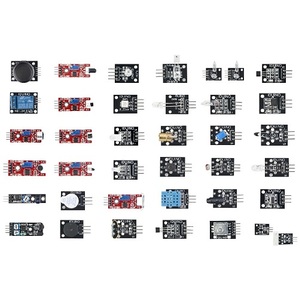
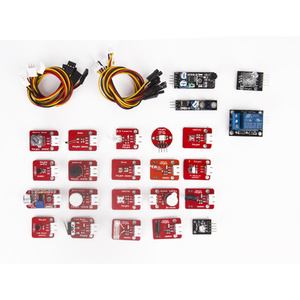
Arduino Sensor Kits and Sensor Modules
What Is an Arduino Sensor Kit?
An Arduino sensor kit is a collection of electronic sensor modules designed to detect and measure changes in the surrounding environment. These kits allow users to connect different sensors to an Arduino-compatible development board and experiment with electronics, programming and automation.
Arduino sensor kits typically include a variety of modules that can detect temperature, light, sound, movement, distance, humidity and other environmental conditions. The collected information is processed by the Arduino board, allowing users to create interactive electronic devices and automated systems.
These kits are suitable for beginners, students, educators and electronics hobbyists who want to explore sensor technology and develop practical Arduino projects.
What Sensors Are Included in an Arduino Sensor Kit?
The sensors included depend on the kit configuration, but common Arduino sensor modules include:
-
Temperature sensors: Measure environmental temperature.
-
Humidity sensors: Detect moisture levels in the air.
-
Light sensors: Measure surrounding light intensity.
-
Sound sensors: Detect sound levels and acoustic signals.
-
Ultrasonic sensors: Measure distances and detect nearby objects.
-
Infrared sensors: Detect infrared signals and nearby objects.
-
Motion sensors: Detect movement within a monitored area.
-
Tilt sensors: Detect changes in orientation or inclination.
-
Flame sensors: Detect infrared radiation associated with flames.
-
Gas sensors: Detect certain gases and changes in gas concentration.
-
Soil moisture sensors: Measure moisture levels in soil.
-
Acceleration sensors: Measure acceleration and movement along different axes.
Some larger sensor collections also include additional modules for experimenting with displays, switches, wireless communication and electronic control.
The exact sensor selection varies between 24-in-1 and 37-in-1 kits, so customers should check individual product specifications.
What Can You Build with Arduino Sensors?
Arduino sensors can be used to create a wide range of interactive electronics and automation projects.
Popular project ideas include:
-
Automatic lighting systems: Use light sensors to activate LEDs when surrounding light levels decrease.
-
Temperature monitoring systems: Measure and display environmental temperatures.
-
Motion detection alarms: Use motion sensors to trigger an alarm when movement is detected.
-
Distance measurement devices: Use ultrasonic sensors to measure the distance between objects.
-
Smart irrigation systems: Monitor soil moisture to help automate watering.
-
Gas detection projects: Experiment with gas sensor modules to monitor changes in gas concentration.
-
Sound-activated devices: Use sound sensors to trigger electronic responses.
-
Obstacle detection systems: Combine ultrasonic or infrared sensors with Arduino-controlled robots.
-
Environmental monitoring stations: Combine temperature, humidity and light sensors to collect environmental data.
These projects help users understand how sensors collect information and how microcontrollers process inputs to control electronic devices.
Benefits of Using an Arduino Sensor Kit
Arduino sensor kits offer several advantages for learning electronics and developing practical projects.
-
Wide component selection: Experiment with different sensors without purchasing each module individually.
-
Beginner-friendly learning: Understand sensor operation through practical experiments.
-
Programming development: Learn how to read sensor data and process information using Arduino code.
-
STEM education: Develop science, technology, engineering and mathematics skills.
-
Project flexibility: Use sensors for robotics, automation, monitoring and interactive electronics.
-
Convenient storage: Multi-sensor kits supplied in plastic cases help organise and protect electronic modules.
How to Choose the Right Arduino Sensor Kit
When choosing an Arduino sensor kit, consider the number and types of sensors included, your experience level and the projects you intend to build.
-
24-in-1 sensor kits: Suitable for users looking for a selection of commonly used sensor modules for general Arduino experimentation.
-
37-in-1 sensor kits: Offer a broader collection of sensor modules for exploring different electronic inputs and applications.
-
Specialised sensor kits: Useful for projects requiring specific measurements, such as temperature, humidity, distance or motion detection.
Also check whether the kit includes an Arduino development board, connection cables, storage case and project instructions. Some sensor kits are supplied as component collections and require a separately purchased Arduino board.
Frequently Asked Questions – Arduino Sensor Kits
1. What is an Arduino sensor kit?
An Arduino sensor kit is a collection of electronic sensor modules designed to work with Arduino-compatible development boards. These sensors allow users to detect and measure environmental conditions such as temperature, humidity, light, sound, movement and distance. The Arduino board processes the information received from the sensors and can use it to control other electronic components or trigger programmed actions. Arduino sensor kits are ideal for learning electronics, programming, automation and practical STEM projects.
2. What sensors are included in an Arduino sensor kit?
The sensors included depend on the kit, but a typical multi-sensor collection may contain:
-
Temperature sensors for measuring environmental temperature.
-
Humidity sensors for detecting moisture in the air.
-
Light sensors for measuring surrounding light intensity.
-
Sound sensors for detecting sound levels.
-
Ultrasonic sensors for measuring distance.
-
Infrared sensors for detecting objects and infrared signals.
-
Tilt sensors for detecting changes in orientation.
-
Motion sensors for identifying movement.
-
Flame sensors for detecting flame-related infrared radiation.
-
Gas sensors for detecting certain gases.
-
Soil moisture sensors for measuring moisture in soil.
-
Acceleration sensors for detecting movement and acceleration.
Some kits also include switches, magnetic sensors, vibration sensors and additional electronic modules. Always check the product specifications for the exact components supplied.
3. What is the difference between a 24-in-1 and 37-in-1 sensor kit?
The main difference is the number of sensor modules and components included in each collection.
A 24-in-1 sensor kit typically provides a selection of commonly used modules for basic electronics experiments and Arduino projects. It is suitable for beginners who want to explore different sensor functions.
A 37-in-1 sensor kit generally offers a larger selection of modules, providing more opportunities to experiment with different inputs, measurements and electronic applications.
The actual sensor types can vary between manufacturers, so compare the included component lists rather than relying on the number of modules alone.
4. Are Arduino sensor kits suitable for beginners?
Yes, Arduino sensor kits are suitable for beginners interested in learning electronics and programming. Most sensor modules are designed to connect to compatible development boards using jumper wires and breadboards. Beginners can start with simple experiments, such as measuring temperature or detecting light, before progressing to more advanced projects involving multiple sensors and automated systems. Example programs and online tutorials can also help users understand how each sensor operates.
5. Do Arduino sensor kits include an Arduino board?
Not necessarily. Many Arduino sensor kits are supplied as collections of sensor modules without an Arduino development board. This means users may need to purchase an Arduino UNO, Mega, Nano or another compatible controller separately. Some complete starter kits include both the development board and sensor modules. Always review the individual product description to confirm whether the Arduino board, USB cable and other accessories are included.
6. How do Arduino sensors work?
Arduino sensors work by detecting physical or environmental changes and converting them into electrical signals that can be interpreted by a microcontroller.
For example, a temperature sensor detects changes in temperature and produces an electrical output corresponding to the measured value. The Arduino board reads this signal and processes it using a programmed sketch. Depending on the application, the board can display the measurement, activate an LED, trigger an alarm or control another electronic device.
Different sensors use different technologies, including analogue voltage outputs, digital signals and communication protocols.
7. What is the difference between an analogue and digital sensor?
An analogue sensor produces a continuously varying electrical signal that represents a measured quantity. The Arduino reads this signal through an analogue input pin and converts it into a digital value using its analogue-to-digital converter.
A digital sensor provides information as discrete digital signals, typically using HIGH and LOW states or a communication protocol such as I2C or SPI.
Analogue sensors are commonly used for applications involving variable measurements, while digital sensors can provide processed readings or communicate more detailed information directly to the Arduino board.
8. What can you build with an Arduino sensor kit?
Arduino sensor kits can be used to develop a wide range of electronics and automation projects, including:
-
Automatic lighting systems using light sensors.
-
Temperature and humidity monitoring devices.
-
Motion-activated security alarms.
-
Ultrasonic distance measurement systems.
-
Soil moisture monitoring and automatic irrigation projects.
-
Sound-activated electronic devices.
-
Obstacle detection systems for robotic vehicles.
-
Environmental monitoring stations.
-
Flame detection experiments.
-
Smart home automation prototypes.
These projects help users understand how electronic sensors collect information and how microcontrollers respond to different inputs.
9. Can Arduino sensors measure temperature and humidity?
Yes, compatible Arduino sensors can measure temperature and humidity. Temperature sensors measure the surrounding air or surface temperature, while humidity sensors measure the amount of moisture in the air. Some modules combine both functions into a single component. The Arduino can read the sensor measurements and display the results on an LCD, send the data to a computer or use the readings to activate fans, alarms or other electronic devices.
10. How do I connect a sensor module to an Arduino UNO?
Most Arduino sensor modules connect to an Arduino UNO using jumper wires and compatible input/output pins.
A typical connection process involves:
-
Identify the sensor's power, ground and signal pins.
-
Connect the sensor's VCC pin to the appropriate Arduino power output.
-
Connect the GND pin to an Arduino ground pin.
-
Connect the signal output to a suitable digital or analogue input pin.
-
Open the Arduino IDE and load a compatible example sketch.
-
Select the Arduino UNO board and the correct communication port.
-
Upload the program and monitor the sensor readings.
Always check the sensor's operating voltage and pin configuration before connecting it to prevent damage.
11. What programming language is used for Arduino sensors?
Arduino sensors are generally programmed using a language based on C and C++. Programs are written as sketches using the Arduino IDE. These programs tell the Arduino how to read sensor signals, process measurements and respond to changes in the environment. Arduino libraries are also available for many sensor modules, making it easier to communicate with components without writing all the control code from scratch.
12. Can I use multiple sensors with one Arduino board?
Yes, you can connect multiple compatible sensors to a single Arduino board, provided there are sufficient input/output pins and available resources. For example, an Arduino UNO can connect to a temperature sensor, light sensor and ultrasonic distance sensor in the same project. Some sensors can also share communication interfaces such as I2C. When connecting multiple modules, consider power consumption, operating voltage, pin availability and possible address conflicts between devices.
13. Are Arduino sensor modules compatible with Arduino Mega and Nano?
Many Arduino sensor modules are compatible with Arduino UNO, Mega and Nano development boards because they use common electrical interfaces such as digital inputs, analogue inputs, I2C and SPI. However, compatibility depends on the sensor's voltage requirements, pin configuration, communication interface and available libraries. Some modules may require different wiring or software adjustments when used with different Arduino boards. Always check the specifications of both the sensor and development board before connecting them.
14. Do Arduino sensor kits require soldering?
Most beginner Arduino sensor kits do not require soldering because their modules are designed to connect using jumper wires, breadboards or pre-installed pin headers. This makes experimentation and component replacement easier. However, some kits may require soldering if components are supplied without headers or if users want to create permanent circuit connections. Check the kit contents before purchasing if you prefer a solder-free learning experience.
15. What software do I need to program Arduino sensors?
The Arduino IDE is the most commonly used software for programming Arduino sensor projects. It is available for Windows, macOS and Linux and provides tools for writing, compiling and uploading code to compatible Arduino boards.
The software also includes example sketches and supports additional libraries for communicating with different sensor modules. Beginners can use these examples to test sensors, read measurements and develop more advanced applications.
16. Are Arduino sensor kits suitable for STEM education?
Yes, Arduino sensor kits are excellent resources for STEM (Science, Technology, Engineering and Mathematics) education. They allow students to explore how electronic sensors measure physical conditions and how microcontrollers process information. Practical projects involving temperature monitoring, motion detection, distance measurement and automated lighting help develop programming, electronics and problem-solving skills. These kits are suitable for classroom activities, school projects, robotics experiments and independent learning.