
Categories
- Spare Parts
- Quadcopter
- Aquaculture
- Raspberry Pi
- Video
- Components
- Gadgets
- Auto & Outdoors
- Home Automation & Security
- Audio
- Mobile Accessories
- IT
- Hobby
- Tools, Test & Mesurement
- Drones
- Drone Battery
- Spare Parts
- Remote Control Drone
- Fishing Release
- Racing Drones
- Autel EVO 2
- FPV Drone
- Mini Drone
- Drone with Camera
- Drones with FPV Display
- Beginner Drones
- GPS Drone
- Wifi FPV Drones
- Waterproof Fishing Drone
-
DJI Drones
- DJI Drone Accessories
- DJI Air 2S
- DJI Drone Spare Parts
- DJI Enterprise
- DJI FPV Racing Drone
- DJI Inspire Drone
- DJI Mavic Air
- DJI Mavic Drone
- DJI Mavic Mini
- DJI Mavic Mini 2
- DJI Spark Drone
- iFlight Racing Drones
- Mavic 2
- Mavic air 2
- Mavic Air 2 fly More combo
- Mavic Air 2 RTF
- Mavic Pro Platinum
- Phantom 3 Drone
- Phantom 4 Advance
- Phantom 4 Drone
- Phantom 4 Pro
- LED Light
- LED Lantern
- LED String / Fairy Lights
- LED Work Light
- LED Party Lights
- LED Torch
- LED Head Torch
- Household LED Light
- 12V LED Lights
-
LED Strip Lights
- Green LED Strip Light
- Power Supply
- Red Led Strip Light
- USB LED Strip Light
- Yellow LED Strip Light
- Accessory
- Blue LED Strip Light
- Neon LED Strip Light
- Rigid LED Strip Lights
- White Led Strip Light
- RGBW LED Strip Lights
- Digital LED Light Strip
- 2835 LED Strip Light Kits
- RGB LED Strip Light
- 5050 LED Light Strip Kit
- Toys
- HDMI
- HDCP Converter
- IQ4 Compatible HDMI Products
- HDMI Wall Plate Socket
- HDMI Audio Extractor
- HDMI Matrix Switcher
- HDMI Wireless Transmitter and Receiver
- HDMI Extender
- HDMI Converter
- HDMI Splitter
- HDMI Switch
- HDMI Adapter
-
HDMI Cable
- Mini Display Port
- Display Port
- Amplified HDMI Cable
- DVI Cable
- HDMI to VGA Cable
- HDMI to Micro HDMI Cable
- HDMI to DVI Cable
- HDMI to Mini HDMI
- Premium High Speed HDMI Cable with Ethernet
- High Speed HDMI Cable with Ethernet
- Hybrid Fibre Optic HDMI 2.0 Cable
- HDMI 2.0 Cable
- 8K HDMI Cable
- 4K HDMI Cable
- Hybrid Fibre Optic HDMI 2.1 Cable
- Media Player & Set Top Box
- Arduino Projects
- Power
- Battery Tester
- Transformer
- DC Power Cable & Connectors
- Solar
- Switchmode Power Supply
- AC Power Cables, Plugs and Sockets
- Powerboard and Adaptors
- Travel Adapter
- Battery Chargers
- Batteries
- USB Charger
-
GPO & Light Switch
- Electrical Accessories
- Circuit breaker & Timers
- Distribution Box
- Plug Base Socket
- Weatherproof Socket
- Black Light Switches
- Clipsal Style White
- Smart Zigbee Power Switch
- Black Power Points
- Smart Zigbee Power Socket
- Slim Series
- Alpha Series
- GPO Wall Sockets
- Power & Light Switch
- Glass Series
- Smart Wifi Power Socket
- Smart Wifi Light Switch
- Switch Mechanisms
-
Power Adapter
- Extension Cables, Splitters and Plugs
- Reversible DC Plug
- Linear Type
- UPS
- Multi-voltage Power Adapter
- 14V DC Power Adapter
- 13.8V DC Power Adapter
- 3.3V Power Adapter
- 19V DC Power Adapter
- 7.5V DC Power Adapter
- Variable Power Supply
- USB Power Adapter
- 18V DC Power Adapter
- 48V Power Supply
- AC Power Adapter
- 24V DC Power Adapter
- 15V DC Power Adapter
- 9V DC Power Adapter
- 6V DC Power Adapter
- 5V DC Power Adapter
- 12V DC Power Adapter
Information
Do I need a HDMI Switcher or a HDMI Splitter?
Author: Aus Electronics Direct Date Posted:7 August 2019
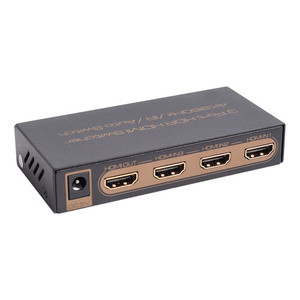

HDMI Switch or HDMI Splitter?
Do I need a HDMI Switch or a HDMI Splitter?
It is very easy to get confused whether you require a HDMI Splitter or a HDMI Switcher. We often come across customers purchase the wrong device for their required application.
On that note, we have decided to create a quick guide to ensure that you are buying the correct HDMI device for your requirements. Firstly, lets explain what each are and what they do.
HDMI Splitter
.jpg)
As the name suggests, a HDMI splitter is a device that takes a single HDMI signal and splits it to multiple outputs for connection to a display (TV’s and Monitors).
.jpg)
Above is a diagram showing how a HDMI Splitter used. In this instance, a 4 Way HDMI Splitter is connected to a DVD or Blu-ray Player which is then split into 4 ways to connect to 4 TV or Monitors. This is a great device to use to avoid having to pay for multiple Set Top Boxes such as Foxtel iQ3 or iQ4 for other rooms around the house.
In most occasions, other TV’s or displays may be far away from the HDMI source, it may be advisable to utilise active HDMI cables, HDMI Extenders or wireless HDMI AV senders to be able to connect other TV’s or Displays to your HDMI Splitter.
HDMI Switcher
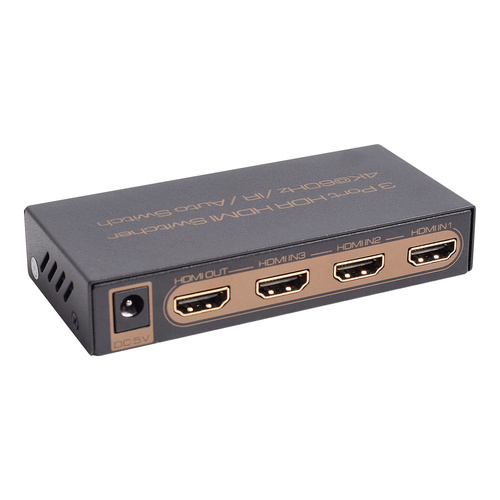
A HDMI switch is essentially the opposite. It is a device that will come in handy if you have a display (TV or Monitor) with only one HDMI input and you have multiple HDMI devices that you wish to connect to it.
.png)
Above is a diagram showing multiple HDMI inputs; Gaming Consoles (PS4 or Xbox), Set Top Boxes (Foxtel iQ3 and iQ4), DVD or Blu-ray Players connected to a 5 Port HDMI Switcher which then connects to the TV’s or Monitors single HDMI input.
Comments (6)
Projector to receiver
By: Raj on 7 February 2024Hello, I have Sony projector and Yamaha 5.1 receiver and the issue is I cannot connect receiver to the projector. The projector has two HDMI input port and Yamaha have HDMI out port. I can connect Amazon firestick to the TV HDMI and HDMI out from receiver to tv HDMI arc port and both picture and sound works great. The problem with the projector I can connect firestick to HDMI input port to the projector and when connect another HDMI out from receiver to projector in...it does not work and only picture display and no sound coming from receiver...sound coming from projector speaker only. Can someone guide me please. Thank you
3 Monitors - Extension
By: KT on 24 July 2023Hi, I want to add a 3rd monitor to my workstation, I have the second screen setup easily, but require a 3rd at this stage and maybe more down the track. All I want is to extend out to a 3rd screen overall - my all in one computer only had 1 hdmi output that my 2nd screen is currently connected to. Can you point me in the right direction.
NewLine RS + interactive TV display
3 November 2022which device would I need if I have an interactive tv with a HDMI and USB cables to connect them to a splitter to then connect the splitter to 4 laptops.
HDMI Switcher
By: Campbell on 28 May 2022A switch is a device that allows you to connect multiple devices to a single output. A splitter is a device that splits the input signal into two or more outputs. HDMI switches are designed to work with HDMI sources only. They can't handle any other type of video signal (such as VGA). If you want to use your TV as a monitor for your computer, then you should use a splitter instead of a switch. Today I was searching some blogs on Google related to tech and when I clicked on some website and read their blog, I did not like it and was not very relevant then I came to your site and read your blog, I felt very much. liked it
Request for Info
20 January 2020Hi there. I have a Foxtel IQ4 from which the HDMI feeds into a two output 4K HDR HDMI Splitter 1x2 (same as the one at the top of the page and purchased from your good selves) . I take one output to an 2019 LG OLED 55" TV and that works fine. The second output goes via an HMDI/Fibre optic cable to a 2019 42" TV but I cannot get a picture. When I connect the HDMI cable to an input port on the TV, I get the message that "HDMI port x is available" but no picture results. I have tried resetting that TV to factory defaults and changing the picture attributes with no success. Even plugging that HDMI cable (which I know is working via testing) directly to the Foxtel IQ produces no picture. Any assistance would be appreciated Regards, Wayne O